
Stage 4 of 4
Govern the living document library for compliance and audit
Audit log, versioning, expiration reminders, archive — the governance layer that makes your library defensible.
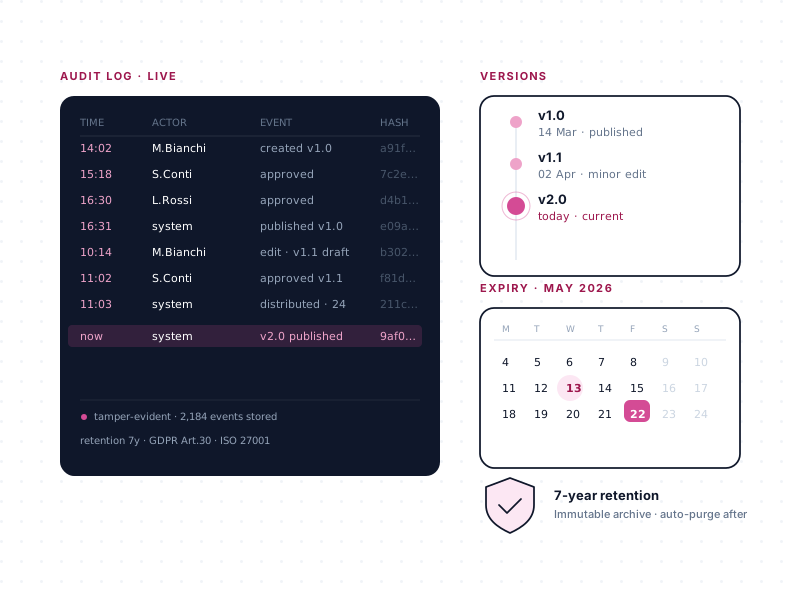
The first three stages — Create, Approve, Publish — produce an approved document in a known place. The fourth stage keeps it that way. It is the stage most organizations underestimate when they buy their first DMS and most regret when their first audit arrives.
A library that isn't actively governed starts going stale the day after launch. Documents expire without anyone noticing. Policies reference regulations that changed. Procedures get revised through back-channels that leave no record. Six months in, the library is a snapshot of six months ago — and nobody trusts it anymore.
docs365.ai keeps the library alive and defensible.
What "defensible on any given day" actually means
A defensible library is one where, at any moment, you can answer four questions without a week of archaeology:
- Who approved this document, and when?
- What was the exact content of the document as of [date]?
- Which documents are about to expire, and who owns them?
- Which documents have been superseded, and what did they say before?
If you cannot answer all four quickly, your library is a liability. The governance stage exists to make those four questions trivial to answer.
The audit log
Every action on every document is written to an audit log tied to the document. The log captures:
- Creation — when the document was first instantiated, by whom, from which template.
- Edits — who made changes, when, to what. Comment activity, @mentions, resolved threads.
- Approval events — who approved, who rejected, in which role, with what comments, against which version.
- Publication events — when the document moved from the editing area to the public area.
- Archive events — when a document was retired, by whom.
- Reminder events — when expiration emails were sent, to whom.
The log is accessible directly from the document's context menu — no separate admin interface, no report to run. Every action is tied to a named Microsoft Entra (Azure AD) identity, so "who did this" is always answerable.
For ISO 9001 surveillance audits, this is the evidence that clause 8.5 (Control of Documented Information) has been met end-to-end. For customers running processes under 21 CFR Part 11, the audit log is the kind of capability they use as part of their Part 11 program — with their own QA team owning validation. For HIPAA and GDPR, it records exactly who handled the document and when.
Versioning — every change preserved, every version recoverable
Versioning is built into SharePoint, and docs365.ai uses it with a deliberate policy overlay:
- Minor versions (0.1, 0.2, 0.3…) while the document is being drafted. Anyone with edit permission can produce a new minor version.
- Major versions (1.0, 2.0, 3.0…) are issued when the document is approved and published. A major version means "this was live."
Every version is preserved. If a colleague accidentally deletes a section, you can revert the document to any prior version in a couple of clicks. If a regulator asks for the exact content of a policy as of a specific date, you can produce it — not a reconstruction, the actual version. If a document is republished after a revision, the previous major version is preserved in the history, not overwritten.
This is the technical foundation for answering "what did the document say on [date]?" and for the Control-of-Obsolete-Information clause common to ISO 9001 and many other standards.
Expiration reminders — active review, not passive auto-delete
Most SharePoint retention strategies are passive: apply a label, set a duration, auto-delete or auto-archive after N years. That's fine for record retention. It's wrong for compliance documents that need periodic review.
docs365.ai treats expiration as an active review prompt, not an auto-delete rule. Every document can carry an expiration date as a first-class metadata field. As the date approaches, the system automatically emails the document's owner — the person responsible for keeping the content current — and prompts them to review, update, or explicitly re-certify the document.
This is how a library stays current. It's how smart-working policies stay aligned with current law. It's how SOPs get reviewed on a documented cadence. It's how ISO 9001 clause 8.5's "review and approve documents for continuing suitability" gets operationalized.
Expiration reminders are included on Enterprise, Premium, and Diamond plans.
Archive — preserve the historical record without cluttering the present
A superseded document has two potential futures:
- Delete it. Clean, but destroys the historical record. Dangerous for any organization subject to audit, litigation, or regulatory review.
- Leave it in the public area. Keeps the record, but now end-users see two versions of the same procedure and don't know which to follow.
Neither is acceptable. The third option — archive — keeps the historical record but removes the document from the active public view. Archived documents are retrievable through a dedicated archived-documents view when the compliance team or an auditor needs them; they don't appear in the active library where end-users look for current policy.
Documents can be archived explicitly (when a new version is published and the old one is no longer in effect) or automatically based on custom rules the customer defines.
Power BI reporting — governance made visible
For organizations that need to report on document-management activity to management, compliance committees, or auditors, a Power BI dashboard is included on Enterprise, Premium, and Diamond plans. The dashboard draws on the same metadata that drives filtering and views, and surfaces:
- Approval-flow metrics — time-to-approval, stalled flows, rejections by document type.
- Expiration risk — documents expiring in the next 30 / 60 / 90 days.
- Document volumes by department, by document type, by period.
- Activity trends — edits, approvals, publications, archives over time.
Because it runs on the customer's existing Power BI, no new BI platform is needed.
Governance is what makes Microsoft 365 the right place for this
Every governance capability above — audit log, versioning, expiration reminders, archive, Power BI reporting — runs inside the customer's Microsoft 365 tenant. The audit log lives alongside the document. The versioning is SharePoint's native versioning. The expiration emails come from within the tenant's mail. The Power BI dashboard reads from the same SharePoint lists. There is no parallel system to secure, no second audit scope, no integration to maintain.
This is the quiet payoff of being Microsoft-365-native. Governance isn't an add-on layer with its own attack surface — it's the same surface your organization has already evaluated, audited, and committed to.
A customer who relies on this
Trenord operates under state audits and sector inspections as a public transport operator. The product provides the documented approval, versioning, and audit-log evidence their compliance team surfaces on demand — across many departments, all in Microsoft 365.
Ready to see it?
Thirty minutes. No cost. No obligation. We'll walk through your current workflow and show where this stage would change it.