
Product · Features
SharePoint document management — every feature, mapped to the stage it serves
docs365.ai covers the full lifecycle of a controlled document — from the template that creates it to the archive that preserves it. Each feature below is grouped by the lifecycle stage it supports, so you can see exactly where it fits.
The problem
Why governed document management needs more than a folder structure
A folder is a location. A controlled-document program is a system. The difference matters the moment an auditor asks who approved version 2.1, when it was published, and who confirmed they read it. SharePoint folders answer none of those questions on their own.
Uncontrolled documents accumulate silently. A procedure saved as "SOP_final_v3_REVISED.docx" in a shared drive carries no approval evidence, no publication timestamp, and no record of who ever saw it. In a regulated environment, that gap isn't just a tidiness problem. It's a finding waiting to happen.
Controlled-document programs in Pharma, Healthcare, Manufacturing, and Legal share a common requirement: every document must carry proof of its status at every point in its life. Who drafted it, who reviewed it, who approved it, when it went live, who read it, when it expires, and what replaced it. That's not a convention you can enforce with naming rules and good intentions. It requires a system that records those events automatically, locks the document at each transition, and keeps the evidence immutable.
docs365.ai adds that system on top of SharePoint, inside the Microsoft 365 tenant your organisation already owns and trusts. No external data processor handles your documents. Every event is recorded in a tamper-evident log that lives in your own environment.
The lifecycle
The four-stage lifecycle
Every feature in this index belongs to one of four stages. Together they cover the complete life of a controlled document, from the first keystroke to long-term archival.
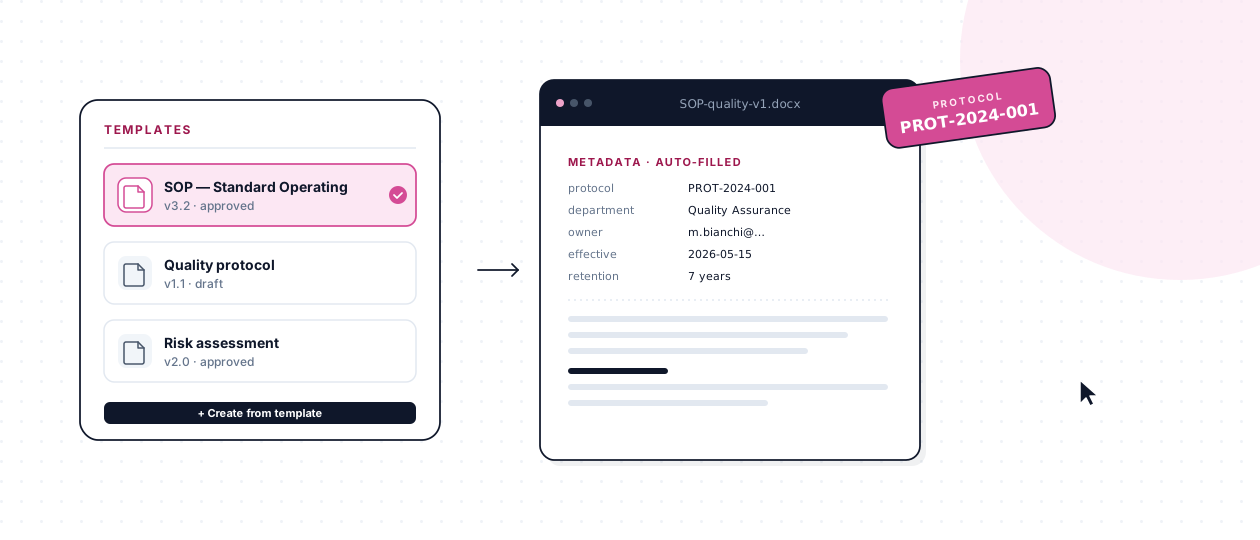
A document is born from a controlled template. Protocol code, metadata, and document type are assigned automatically at creation. Co-authoring in Word Online keeps collaboration real-time without breaking the audit chain.
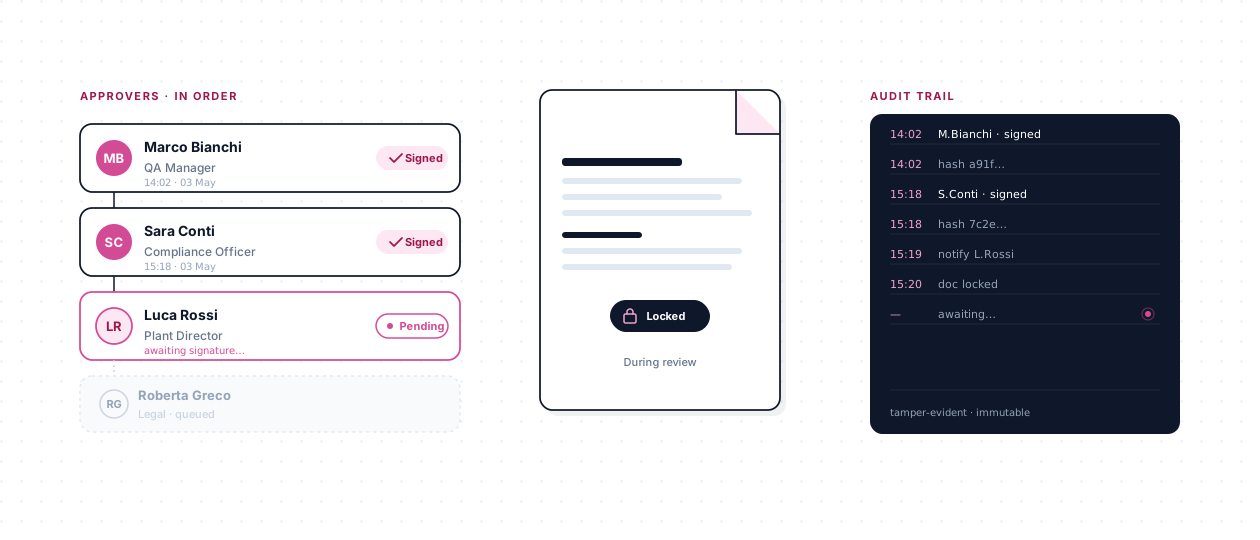
Named approvers, in a defined sequence, with role-based routing. The document is locked during review. Each sign-off is timestamped. PAdES e-signatures via DocuSign bind signatures cryptographically when the standard demands it.
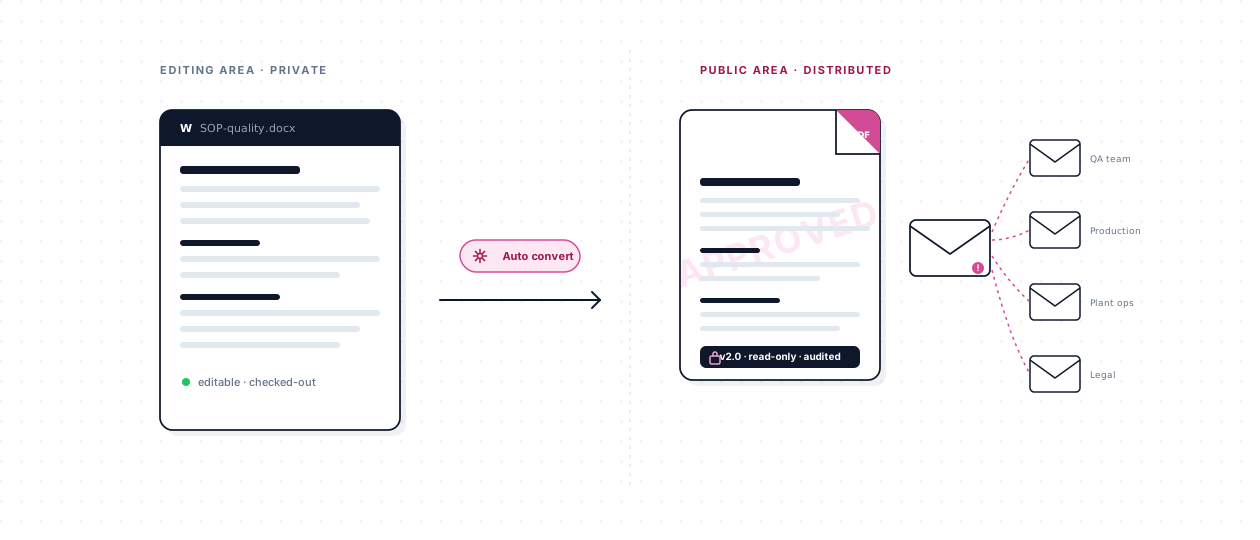
Approval completion triggers automatic Word-to-PDF conversion. The PDF is immutable. A distribution-list email reaches the right audience at the right moment. The prior version is archived, not deleted.
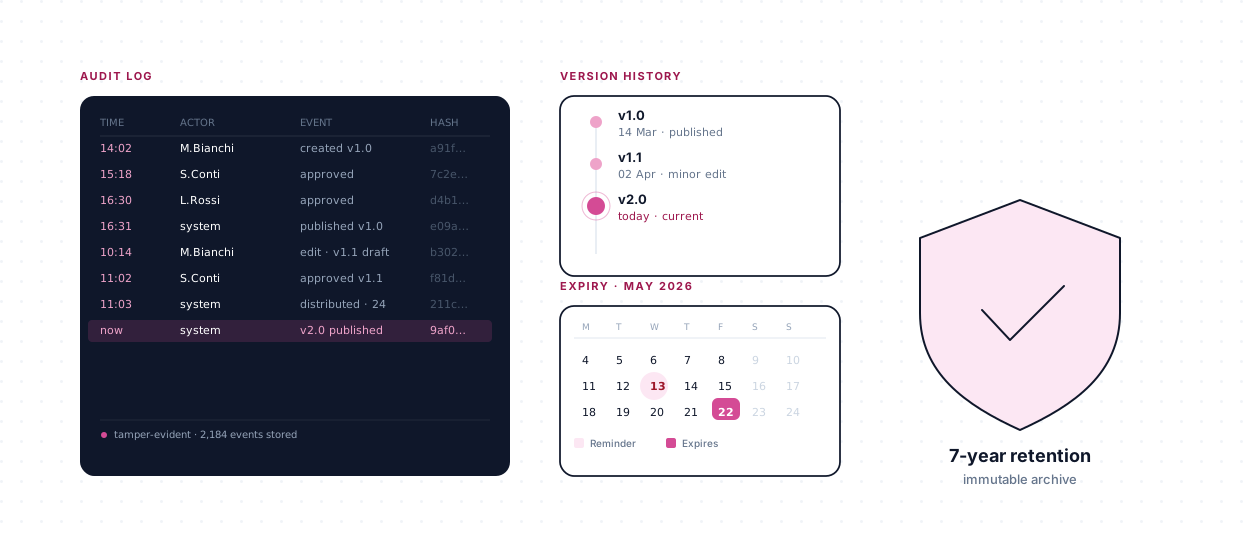
The full audit log, version history, and expiration reminders keep every document under active oversight. Power BI dashboards surface the governance picture across the entire document portfolio.
Compliance mapping
How features map to compliance requirements
Each feature page in this index includes a compliance mapping section. That section identifies the specific standard article or regulation clause the feature supports, so a compliance officer or quality manager can trace a requirement directly to the capability that addresses it.
The frameworks covered span the most common regulatory environments for regulated industries. ISO 9001 §7.5 requires documented information to be controlled, created, updated, and retained with defined retention periods. ISO 27001 Annex A.5.33 demands that records be protected from loss, destruction, and falsification. GDPR Article 30 requires organisations to maintain a record of processing activities, which includes the documents that govern those activities.
In life sciences and healthcare, the requirements are more granular. FDA 21 CFR Part 11 §11.10 specifies that electronic record systems must produce accurate and complete copies, protect records throughout their retention period, and limit system access to authorised individuals. HIPAA §164.312 adds access controls and audit controls for systems that create, receive, maintain, or transmit electronic protected health information. NIS2 Article 21 requires organisations in critical sectors to implement document-level risk management practices as part of their cybersecurity obligations.
Use this features index as your starting point. Click any feature to read how it works and which compliance article it directly supports. If your organisation is preparing for an audit, the compliance mapping on each feature page gives you a ready-made traceability matrix to share with auditors or assessors.
ISO 9001 §7.5
Documented information — control, creation, and retention
ISO 27001 A.5.33
Protection of records from loss and falsification
GDPR Art. 30
Records of processing activities
FDA 21 CFR Part 11 §11.10
Electronic records — accuracy, protection, and access control
HIPAA §164.312
Access and audit controls for electronic health records
NIS2 Art. 21
Risk management for critical-sector organisations
Stage 1 · Create
Authoring — with the controls baked in
Every document starts from a controlled template, carries the metadata that makes it findable, and picks up a unique protocol code the moment it's created. Co-authoring in Word Online keeps collaboration real-time without losing the audit trail.
-
Document templates
Every document starts from a controlled, approved template — consistency baked in from the first keystroke.
Learn more
-
Protocol numbering
Unique, permanent IDs on every document — the identifier that makes your library audit-ready.
Learn more
-
Custom metadata
Every document carries the attributes your organization cares about — searchable, filterable, governable.
Learn more
-
Real-time co-authoring
Multiple editors in Word Online at the same time — with every edit, comment, and @mention captured for audit.
Learn more
Stage 2 · Approve
Sequential approval, evidence-ready
Named approvers, in order, with role-based routing. Fixed pre- and post-flow approvers for roles that must always sign off. PAdES e-signature via the DocuSign integration when signatures must be cryptographically bound.
-
Sequential approval
Named approvers, in defined order, with role-based routing — every step logged, every version tied to the approvals that produced it.
Learn more
-
Fixed approvers
Mandatory pre- and post-flow approvers per document type — the roles that must always sign off, captured automatically every time.
Learn more
-
DocuSign e-signature integration
PAdES signatures — simple and advanced — cryptographically bound to the approved PDF, inside the same approval flow.
Learn more
Stage 3 · Publish
From approved to distributed — automatically
Word becomes immutable PDF the moment approval completes. Distribution-list email goes out to the right audience. Read-receipts (a separately purchased sister product) add acknowledgment tracking when documented awareness is required.
-
PDF publication
Word becomes immutable PDF the moment approval completes — automatically, without a human deciding.
Learn more
-
Distribution-list notification
The right people learn about the document the moment it's published — automatically, with the link to the approved PDF.
Learn more
-
Read-receipts
Confirm exactly who has read each policy — acknowledgment tracked, evidence captured.
Learn more
Stage 4 · Govern
The long game — versioning, audit, and review
Complete audit log on every document. Full version history, revertible to any prior state. Expiration reminders that prompt active review. Superseded versions archived, not deleted. Power BI dashboards aggregate the governance picture.
-
Audit log
Every action, every approval, every version — captured against a named user, accessible in 30 seconds.
Learn more
-
Versioning
Minor versions while drafting, major versions at publication — every state preserved, every version recoverable.
Learn more
-
Expiration reminders
Every document carries an expiration date; the owner is reminded before it hits — review, revise, or retire, on cadence.
Learn more
-
Archiving
Superseded and retired documents leave the active view but stay part of the permanent record — retrievable for every future audit.
Learn more
-
Power BI reporting
The aggregate view — approvals, expirations, review cadence, and governance discipline in one dashboard.
Learn more
-
Govern — end-to-end
See how these features work together across the govern stage.
See the stage
Cross-cutting
The formats and foundations
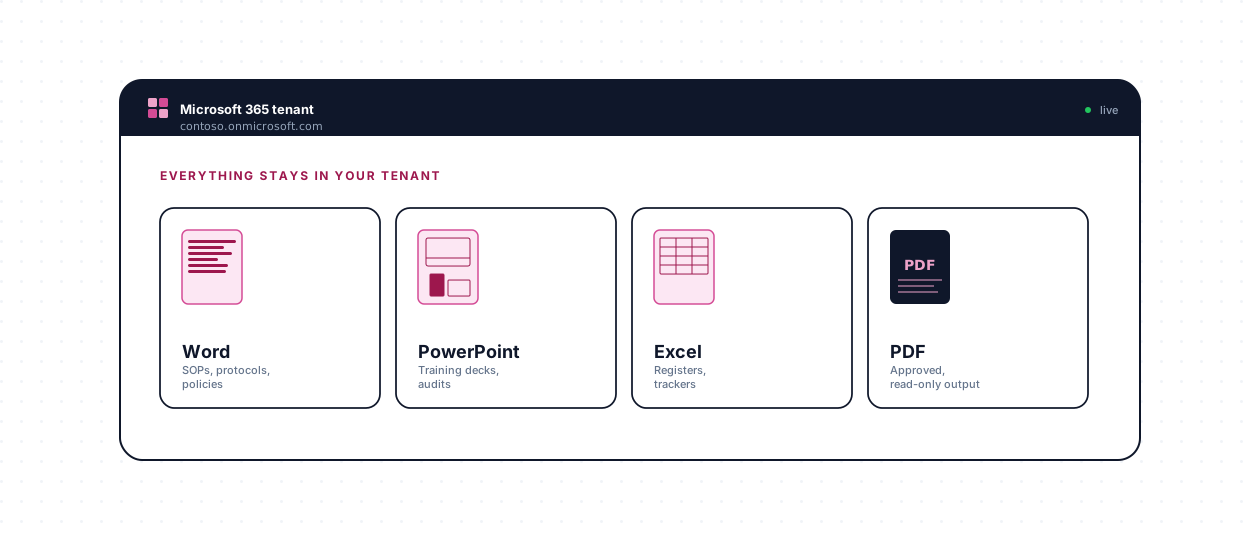
Word, PowerPoint, Excel, and PDF — each with the lifecycle behaviors that make sense for the format. Everything inside the Microsoft 365 tenant you already trust.
Cross-cutting
File-format support
Word as the first-class authoring format; PowerPoint, Excel, and PDF all fully governed through the lifecycle.
Read moreSee the features running on your own documents
Thirty minutes. No cost. No obligation. We'll walk through the capabilities that matter for your compliance and operational profile.