
Stage 1 of 4
Create a document from a controlled template
Version number, protocol code, and metadata populate automatically, so the document starts right.
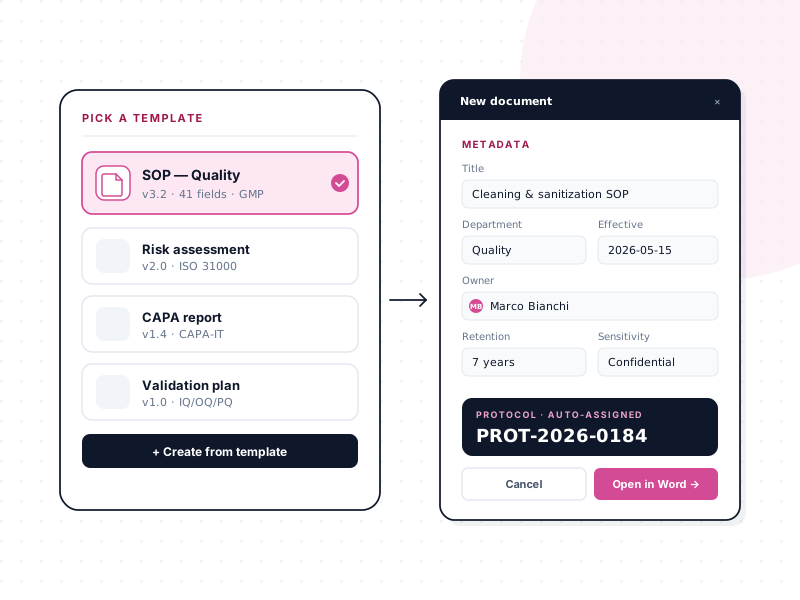
A document that starts wrong stays wrong for the rest of its life. Every downstream governance control — approval flows, versioning, expiration reminders, audit evidence — depends on the document having the correct identity from the moment it exists. Creation is where that identity is established, and creation is where most organizations lose control without realising it.
The problem with how most organizations create documents
In most companies, a new procedure or policy starts with somebody opening Word, reusing an old template they found on their laptop, and saving the file on their desktop. Ten minutes later the document has the wrong version number, carries fields from an unrelated document, and lives in a place nobody else can find. Six months later, when the compliance officer asks for all procedures effective during Q2, nobody can confidently list them.
Template discipline isn't glamorous, but it's the single cheapest way to prevent an enormous amount of downstream pain. docs365.ai makes it the default, not the exception.
Governed templates, per document type
Each document type — SOP, work instruction, policy, contract, training record, change control — can be bound to a Word template that is administered centrally. When a user creates a new document of that type, the system clones the governed template. There is no "find the template on the fileshare" step. There is no "is this the latest version of the template?" question.
Multiple templates per library are supported. A department with several SOP formats can have several SOP templates. The base product ships with one template per library configured at setup; additional templates are added as part of the implementation project.
Auto-populated fields — the system writes them into the document
When a new document is created from a template, the system writes the following directly into the document body (not just into the library metadata where nobody ever looks):
- Version number. Starts at 0.1 as a draft minor version. Promoted to 1.0 when the document is approved and published. Subsequent edits follow the minor/major pattern.
- Protocol code. A unique identifier composed from configurable parts — area or department code, document-type code, and SharePoint's internal unique ID. The protocol code is customizable via a supported syntax at configuration time.
- Configured metadata. Any additional fields the organization wants written into the document — effective date, author, department, review cadence, related-document references. Each field is either editable (the author can change it during drafting) or read-only (system-owned; the author cannot overwrite it).
Why this matters. The single most common cause of document errors is a human being updating the content of a document but forgetting to bump the version number. With the system writing those fields directly, the error becomes impossible.
Multiple colleagues, one document, no email attachments
Because the underlying documents live in Word Online on SharePoint, multiple colleagues can edit the same document at the same time. Each active editor shows up in the header. In-document comments support @mentions. Comment threads are resolvable and preserved in the version history.
Nobody emails a file to anybody. Nobody ends up with four copies of the same document on their laptop. Nobody reconciles three colleagues' edits by hand.
If a colleague accidentally deletes a section, the version history lets you revert — to any prior point, all the way back to the moment of creation.
Read-only vs. editable metadata
Metadata fields are not just governance plumbing. They power filtering, grouping, custom views, Power BI reporting, expiration reminders, and the approval flow. The distinction between read-only fields (system-owned) and editable fields (author-owned) is what keeps the governance trustworthy.
- Version, protocol code, approval dates, publication date — system-owned. An author cannot change these. They are the backbone of audit evidence.
- Document owner, effective date, applicable departments, review cadence, tags — author-owned. The author fills these in because they know the content.
Customers decide during implementation which metadata fields matter for their document types and which of those are system-owned vs. author-owned. The Excel-driven configuration import (filled in by the customer, imported by the system) generates the whole information architecture — areas, libraries, document types, metadata fields — in one pass.
What this stage prevents, in practice
- Documents with the wrong version number.
- Procedures using the wrong template because somebody reused an old file.
- "Final v3 — FINAL.docx" and its cousins.
- Metadata that lives in a spreadsheet on one person's laptop.
- Lost comment threads across email chains.
- Accidental content loss with no way to recover.
What this stage enables, downstream
Because every document starts with a protocol code, a known version, and correct metadata, the downstream stages — approval, publication, governance — have something to work with. The audit log has a unique ID to tie actions to. The approval flow knows who the document owner is. The expiration reminder knows when to trigger. The compliance team can filter the library by department, by document type, by effective date, or by review cadence and get an accurate picture on the first try.
Creation is the cheapest stage to do well. It pays dividends in every other stage.
Ready to see it?
Thirty minutes. No cost. No obligation. We'll walk through your current workflow and show where this stage would change it.